The on and off symbols circle and line tell you how a device controls electrical power. A vertical line usually means on, while a circle means off. When the line and circle appear together as one button symbol, the meaning may be power, standby, or a single control that switches between operating states.
You can find these symbols on computers, televisions, game consoles, kitchen appliances, power tools, medical equipment, industrial machines, and touchscreen menus. Although they look simple, their exact meanings depend on their design and the type of switch being used.
Quick Meaning
The vertical line “I” means on, and the circle “O” means off. A line placed inside or partly inside a broken circle usually identifies a power or standby button. A line fully enclosed by a circle can indicate one control that alternates between on and off states.
Symbol Overview Table
| Field | Details |
| Common name | On/off symbols, power symbols, circle-and-line power icon |
| “On” symbol | Vertical line: I or ⏽ |
| “Off” symbol | Circle: O or ⭘ |
| Standby or power symbol | Broken circle with vertical line: ⏻ |
| Power on-off symbol | Line inside a complete circle: ⏼ |
| Primary meaning | Controls or identifies the power state of equipment |
| Category | Electrical, electronic, engineering, and user-interface symbol |
| Standard system | IEC 60417 graphical symbols for equipment |
| Common uses | Switches, buttons, touchscreens, control panels, appliance labels |
| Unicode power symbol | ⏻ U+23FB |
| Unicode power on-off symbol | ⏼ U+23FC |
| Unicode power on symbol | ⏽ U+23FD |
| Unicode off equivalent | ⭘ U+2B58, Heavy Circle |
| Related symbols | Standby, sleep, restart, disconnect, mains switch, battery |
What Do the Circle and Line Power Symbols Mean?
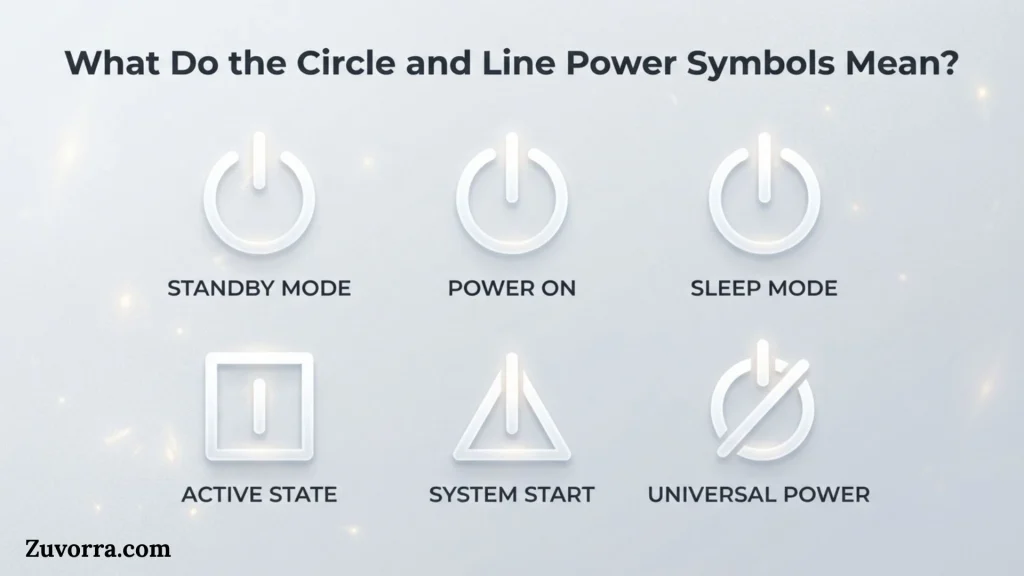
The circle and line are standardized graphical signs used to communicate a device’s power function without relying on written language.
The basic meanings are:
- I means on.
- O means off.
- ⏻ commonly means power or standby.
- ⏼ means a single control that switches power on and off.
The International Electrotechnical Commission identifies the vertical line as the “ON” power symbol and the circle as the “OFF” power symbol. The off symbol is intended to indicate disconnection from the mains in situations where that distinction affects safe use.
The combined designs need more careful interpretation. They do not always promise that the device has been completely disconnected from electricity.
The Vertical Line Means On
The vertical line, often printed as I, indicates that equipment is in its operating state. On a rocker switch, pressing the side marked with the line normally closes the relevant circuit and allows electrical energy to reach the equipment.
The line may appear as:
- A simple straight stroke
- A short raised mark
- The Unicode symbol ⏽
- A white mark printed on a dark switch
- A lighted indicator beside a control
Its meaning is functional rather than decorative: the equipment should enter its active or powered condition.
The Circle Means Off
The circle, usually printed as O, identifies the off position. On a mechanical mains switch, selecting this position generally opens the switch and interrupts the intended electrical connection.
The circle can look like:
- The capital letter O
- A narrow oval
- A thick ring
- A heavy circular mark
- The Unicode character ⭘
Although people often call it “zero,” its technical purpose is to identify the off state. On equipment where safety is involved, the exact electrical result depends on the product design, applicable standards, and whether the switch truly disconnects the mains supply.
The Broken Circle and Line Mean Power or Standby
The familiar symbol ⏻ has a vertical line entering the top of an incomplete circle. It is often called the power button symbol, though IEC usage associates this form with standby.
Pressing it may:
- Turn a device on
- Move it into standby
- Wake it from a low-power state
- Begin a software-controlled shutdown
- Open an on-screen power menu
- Perform different actions depending on how long it is held
For this reason, ⏻ should not automatically be interpreted as full electrical isolation. A television that appears off after pressing this button may still receive electricity for its remote-control receiver, clock, network connection, memory, or wake functions.
The Complete Circle and Line Mean Power On-Off
The symbol ⏼ places a vertical line inside a complete circle. It identifies a control that can change the equipment between on and off states.
This form may appear on:
- Push-button switches
- Latching electronic controls
- Software interfaces
- Industrial panels
- Audio equipment
- Computer peripherals
Unlike separate I and O labels, it usually marks one control rather than two clearly separated switch positions.
History and Origin
The modern symbols developed from the need for internationally understandable equipment labels.
As electrical appliances and electronic devices entered markets around the world, manufacturers needed symbols that could work across languages. Words such as “on,” “off,” “power,” and “standby” would require translation, use more space, and create problems on small controls.
International standardization offered a practical solution. The IEC 60417 system collects graphical symbols designed for use on electrical and electronic equipment. Its catalog includes:
- IEC 60417-5007 for “ON” power
- IEC 60417-5008 for “OFF” power
- IEC 60417-5009 for standby
- IEC 60417-5010 for power on-off
The separate on and off symbols were published in the early 1970s within the IEC graphical-symbol system. Their adoption helped manufacturers label switches consistently across consumer, professional, and industrial equipment.
Did the Symbols Come from Binary Code?
The line and circle are commonly explained as versions of the binary digits 1 and 0:
- 1 represents an active, true, or energized condition.
- 0 represents an inactive, false, or de-energized condition.
This explanation fits modern digital logic and helps people remember the symbols. However, users should avoid treating every printed I and O as a literal binary number. On equipment, they function as internationally recognized graphical labels rather than mathematical values being calculated by the machine.
The binary comparison is useful as a memory aid, but the safety meaning comes from the standardized equipment symbol and the engineering of the switch.
Evolution into Digital Interfaces
At first, the marks appeared mainly on physical controls such as rocker switches and push buttons. They later moved into software and digital design.
Today, the same icon may appear on:
- Computer login screens
- Operating-system menus
- Mobile apps
- Smart-home dashboards
- Touch-sensitive appliance panels
- Vehicle infotainment systems
- Remote controls
- Web interfaces
This shift changed the user’s expectation. A physical mains switch may interrupt an electrical circuit, but an on-screen icon can only send a command to software. The image may be identical even though the technical action is completely different.
Symbolism and Interpretation
The on and off marks primarily have technical meanings, but their design also carries broader symbolic associations.
Traditional Meaning
Traditionally, the symbols express two opposite operational states:
- Connected and disconnected
- Active and inactive
- Running and stopped
- Energized and de-energized
- Available and unavailable
Their strength comes from contrast. A straight line appears firm, direct, and active. A closed circular form can suggest zero, absence, or an interrupted state.
Modern Meaning
In modern electronics, power is often not a simple two-state condition. A device may operate in several modes:
- Fully on
- Idle
- Sleep
- Standby
- Soft off
- Mechanically disconnected
The combined power icon has therefore become a general command for managing device state rather than a guarantee of complete disconnection.
On a laptop, selecting the power icon might open choices for sleep, restart, and shutdown. On a television, it may activate standby. On a wireless speaker, it may start pairing only when held. The surrounding interface and instruction manual determine the actual behavior.
Positive Symbolism
The symbol may suggest:
- Control
- Readiness
- Activation
- Energy
- Simplicity
- Modern technology
- Beginning or renewal
Designers use it in logos and artwork because most viewers quickly associate it with starting, awakening, or taking control.
Negative Symbolism
In other settings, it can imply:
- Shutdown
- Disconnection
- Loss of energy
- Silence
- Withdrawal
- System failure
- Digital dependence
A broken or darkened power symbol in visual storytelling may represent exhaustion, isolation, death of a machine, or the end of communication.
Psychological Interpretation
The icon is effective because it offers a strong visual action cue. Users often recognize it before reading nearby text. Its simple geometry reduces the mental effort needed to find a device’s main control.
However, familiarity can also create overconfidence. A person may assume that pressing any power icon makes equipment electrically safe to open, repair, or clean. That assumption can be dangerous. Visual recognition should never replace lockout procedures, unplugging, or manufacturer instructions when hazardous energy may remain.
Cultural Significance
The circle-and-line icon has no single ancient or national cultural origin. Its importance comes from global industrial standardization.
Unlike a word, the symbol can appear on products sold in North America, Europe, Asia, Africa, South America, and Oceania without changing its basic form. This language-independent design is especially useful for international manufacturing.
Regional differences may still appear in practice:
- Some products use I and O.
- Others use the words ON and OFF beside the symbols.
- Some rocker switches use 1 and 0.
- Digital devices may use only ⏻.
- Industrial controls may use colored push buttons with separate labels.
- Safety-critical equipment may require additional disconnection markings.
Interpretation also depends on local technical regulations and product categories. A symbol recognized worldwide does not mean that every device uses the same internal wiring or power-management behavior.
Scientific and Technical Meaning
Electrical Meaning
In electrical equipment, the marks usually identify positions or controls related to the equipment’s power supply.
A mechanical switch can alter a circuit by opening or closing electrical contacts:
- Closed contacts permit current to pass through the intended path.
- Open contacts interrupt that path.
This basic model explains the on and off positions, but real equipment may use more complex arrangements. A switch can be single-pole, double-pole, momentary, latching, electronic, or software-controlled.
The off position may interrupt:
- One conductor
- Multiple conductors
- A low-voltage control signal
- A relay circuit
- A software process rather than the mains supply
Therefore, the symbol alone does not reveal the full circuit design.
Engineering and Safety Meaning
From a safety viewpoint, off is not always the same as isolated.
A device can appear off while still containing:
- Live mains voltage
- Charged capacitors
- Battery power
- Stored mechanical energy
- Backup power
- Network-triggered wake circuits
- High-voltage sections
- Heat or pressure
The IEC description for the off symbol specifically connects it with mains disconnection where safety is involved, but technicians must still follow the equipment documentation and approved isolation procedures.
For maintenance, the safer decision process is:
Does the control only place the device in standby?
↓
Do not treat it as isolated.
Does the equipment have a separate mains switch?
↓
Use the switch as instructed, then follow the required disconnection procedure.
Could stored or secondary energy remain?
↓
Wait, discharge, lock out, test, or obtain qualified service as required.
Digital and Software Meaning
In software, the symbol acts as an interface command. It does not directly move electrical contacts.
Depending on the system, clicking it may:
- Sign out the current user
- Lock the screen
- Enter sleep mode
- Restart the operating system
- Shut down software
- Request hardware shutdown
- Open a list of power options
A software shutdown usually allows the operating system to close files, stop services, and save settings before the machine changes state. Holding a physical power button may force a shutdown, which can risk unsaved work or file-system problems.
Unicode Meaning
Unicode provides digital characters for several standardized power marks:
| Character | Unicode name | Code point | Typical association |
| ⏻ | Power Symbol | U+23FB | Standby or general power |
| ⏼ | Power On-Off Symbol | U+23FC | One control for switching on and off |
| ⏽ | Power On Symbol | U+23FD | On |
| ⭘ | Heavy Circle | U+2B58 | Used as the off symbol |
Unicode places the first three characters in the Miscellaneous Technical block. Its names list links ⏻ with IEC 5009, ⏼ with IEC 5010, and ⏽ with the power-on meaning.
The Unicode Technical Committee accepted the power characters for future encoding in 2014, and they were later included in Unicode 9.0.
These are text characters, not emoji in the usual colorful pictographic sense. Their appearance depends on the font, operating system, browser, and application.
Where the Symbols Are Used
Computers and Laptops
The symbol appears on power buttons, keyboards, login screens, start menus, monitors, docks, and charging accessories. Its action may include startup, sleep, shutdown, or forced power-off.
Televisions and Remote Controls
Televisions commonly enter standby when the user presses ⏻. The screen turns dark, but the remote sensor and other circuits may remain active.
Home Appliances
Microwaves, washing machines, coffee makers, air purifiers, ovens, fans, and dishwashers may use the symbol for a main control or operating-mode button.
On an appliance, “off” may stop a program without disconnecting the product from the wall outlet.
Networking Equipment
Routers, modems, switches, and wireless access points may use a mechanical on/off switch, a push button, or no power control at all. Restarting may require unplugging the power adapter rather than tapping a software icon.
Medical Equipment
Medical devices use standardized controls to reduce language barriers and operating errors. Because incorrect power handling can affect patient care, users must follow the device’s specific instructions rather than relying only on a familiar symbol.
Industrial Machinery
Industrial machines may combine power symbols with emergency-stop controls, disconnect switches, status lamps, and start/stop buttons. The ordinary power icon must not be confused with an emergency stop or energy-isolation device.
Vehicles
Cars, motorcycles, boats, and electric vehicles may use a power icon for electronic systems or engine-start controls. In a vehicle, the symbol can represent system readiness rather than a direct mains connection.
Websites and Apps
Digital designers use the icon for logout, shutdown, deactivation, account status, server controls, and smart-home devices. Clear labels are important because “power,” “sign out,” and “disable” are not interchangeable actions.
Art, Tattoos, and Logos
In creative use, the mark may symbolize personal energy, technology, transformation, control, recovery, or beginning again. A tattoo can express the choice to “switch on” one’s purpose, while a logo may suggest digital services or electronic products.
These meanings are modern interpretations, not official technical definitions.
Common Variations
Separate I and O Symbols
A rocker switch may show I on one end and O on the other. The pressed side indicates the selected state.
I/O Marking
Some devices print I/O together beside a switch. This identifies the control as the device’s on/off switch rather than indicating that both states are active at once.
Broken Circle with Line
The ⏻ design uses a line that enters an incomplete circle. It commonly identifies standby, soft power, or a general power command.
Complete Circle with Line
The ⏼ form uses a full circle around the line and represents one control that changes between on and off.
Line Fully Inside a Circle
Manufacturers sometimes alter the proportions, line weight, spacing, or position. Small design differences can make ⏻ and ⏼ look similar, especially on low-resolution screens.
Illuminated Power Button
A power symbol may glow to show status. The light may indicate:
- Device on
- Standby
- Charging
- Fault condition
- Network activity
Color meanings vary by product. Green does not always mean fully on, and red does not always mean completely off.
Touchscreen Version
A touchscreen button may use the same shape but trigger a software command. It provides no physical proof that electrical energy has been removed.
Common Misconceptions
“The Circle Means the Letter O”
It looks like an O, and people commonly call it that. Technically, it functions as a graphical off mark. Its shape can also resemble the numeral zero, which supports the familiar binary explanation.
“The Line Always Means the Device Is Safe and Running”
The line identifies the on function or position, but a device can still be starting, faulty, locked, or waiting for another command. An on mark describes the control, not every possible operating condition.
“The Power Icon Means Completely Off”
The broken-circle power symbol often places a device in standby. Electricity may still reach part of the equipment.
“Off Means There Is No Electrical Hazard”
Stored energy, batteries, multiple supplies, capacitors, and incorrectly wired circuits can remain hazardous. Proper isolation requires more than observing the switch position.
“Every Combined Symbol Has the Same Meaning”
⏻ and ⏼ are related but distinct standardized designs. One is associated with standby or general power, while the other identifies a power on-off control.
“It Is an Ancient Symbol”
The modern equipment marks belong to twentieth-century electrical and electronic standardization. Similar circles and lines appear throughout older art and writing, but that does not make those earlier forms power-button symbols.
“The Symbol Is an Emoji”
Power symbols are encoded as technical Unicode characters. Some platforms may style them attractively, but Unicode classifies them within a technical-symbol block rather than as ordinary pictographic emoji.
10 Interesting Facts About the Power Symbols
1. The Simplest Forms Use Only Two Shapes
A straight line and circle communicate opposing states without words. This makes them useful on very small controls and products sold internationally.
2. Four Related Symbols Have Different Functions
The separate on mark, separate off mark, standby mark, and combined on-off mark should not be treated as one interchangeable icon family.
3. The Most Familiar Power Icon Often Means Standby
The broken circle and line ⏻ is widely called an on/off symbol, yet standardized references connect it with standby. This explains why pressing it may leave parts of a device energized.
4. Unicode Added Dedicated Power Characters Relatively Recently
The power-symbol characters entered Unicode years after computers had already displayed similar icons through custom fonts, images, and manufacturer-specific character sets. Unicode acceptance improved their use as searchable, copyable text.
5. A Font Can Change the Symbol’s Appearance
The thickness, gap, line length, and circle shape vary across fonts. A poorly designed font can make the standby and on-off symbols difficult to distinguish.
6. A Physical and Digital Icon Can Look Identical
On a mains switch, the icon may identify an electrical switching action. On a screen, the same icon is only a visual command sent to software.
7. The Symbol Can Control More Than Power
Designers sometimes reuse it for account logout, feature activation, server availability, or smart-home controls. Such reuse can cause confusion when the result is not actually a power change.
8. An Indicator Light Is Not the Same as a Switch Position
A glowing icon may report status rather than provide control. Users should check whether the symbol is printed on a button, beside a lamp, or shown only on a display.
9. “Soft Off” Is Still a Powered State
Many modern electronics maintain limited functions after shutdown. Examples include remote wake-up, timers, memory retention, charging, and network access.
10. Simple Symbols Still Require Documentation
Standardized graphics reduce language barriers, but they cannot describe every feature. Long-press actions, safety isolation, sleep behavior, and indicator colors still require clear instructions.
Related Symbols
Standby Symbol ⏻
This broken circle with a vertical line commonly identifies standby or a general power function. It may wake or suspend equipment without disconnecting the supply.
Power On-Off Symbol ⏼
This full circle with a line indicates one control that alternates between on and off.
Sleep Symbol
A crescent moon often marks sleep or low-power mode. Sleep preserves more active system state than a full shutdown.
Restart Symbol
A circular arrow usually means restart, refresh, reload, or reset. It should not be confused with ordinary power-off because it normally starts the system again automatically.
Eject Symbol
A triangle above a line opens or releases removable media. It may appear near power controls but performs a completely different task.
Emergency-Stop Symbol
Industrial emergency-stop controls usually use a red mushroom-shaped button, often on a yellow background. They are designed for urgent stopping and must not be replaced by a normal power button.
Disconnect or Isolator Symbol
Electrical isolation controls indicate separation from a power source. Their purpose is more safety-specific than a standby or software power icon.
Battery Symbol
A battery icon shows stored-energy status, charging, or remaining capacity. Turning off a battery-powered product does not remove the battery’s stored electrical energy.
Frequently Asked Questions
Is the circle on or off?
The circle means off. It often appears as O, zero, or a heavy circular mark on a rocker switch. Selecting that side normally changes the equipment to its off condition. However, you should check the manual before assuming the device is completely disconnected from electricity.
Is the line on or off?
The vertical line means on. It may appear as I, a short bar, or the Unicode character ⏽. On a mechanical switch, pressing the line side generally selects the active state. The device may still need time to start or complete a separate operating sequence.
What does a circle with a line through the top mean?
A broken circle with a vertical line entering from the top is the familiar power symbol ⏻. It commonly controls startup, shutdown, wake, or standby. Its exact result varies by product, so it does not always mean full mains disconnection.
What is the difference between ⏻ and ⏼?
The ⏻ symbol is associated with standby or general power control. The ⏼ symbol identifies a power on-off control that alternates between states. They look similar, but one has an incomplete circle while the other uses a complete circle.
Does pressing the power button stop all electricity?
Not necessarily. Many devices remain partly energized in standby or soft-off mode. Remote receivers, clocks, chargers, network circuits, batteries, and capacitors may remain active. Unplugging or using an approved isolation method may be necessary before cleaning, servicing, or opening equipment.
Why do on and off look like 1 and 0?
The shapes are commonly linked with binary logic, where 1 represents an active state and 0 represents an inactive state. This is a useful way to remember them. On equipment, however, they operate as standardized graphical symbols rather than numbers in a calculation.
Which side of a rocker switch is on?
The side marked I is on, while the side marked O is off. Usually, the side that is pressed inward shows the selected position. Switch orientation varies, so do not assume that “up” always means on or that “down” always means off.
Why is my device still using power when it is off?
It may be in standby rather than mechanically disconnected. Devices can use small amounts of energy for clocks, remote-control detection, network connections, memory, updates, or wake functions. The product manual should explain whether its button provides standby, soft shutdown, or full disconnection.
Can I copy and paste the power symbol?
Yes. Common Unicode forms include ⏻ for Power Symbol, ⏼ for Power On-Off Symbol, and ⏽ for Power On Symbol. Display quality depends on font support, so the character may appear as a blank box on older systems.
Is a power button the same as an emergency stop?
No. A normal power button controls routine device operation. An emergency-stop control is designed to stop hazardous machinery quickly during an emergency. It normally has a distinct red, easy-to-hit design and follows specific safety requirements. Never use the two controls as substitutes.
Key Takeaways
- The vertical line I means on.
- The circle O means off.
- The broken circle and line ⏻ commonly means power or standby.
- The complete circle and line ⏼ identifies a power on-off control.
- A standby symbol does not guarantee electrical disconnection.
- A physical switch and an on-screen power icon may perform very different actions.
- Devices can retain mains voltage, battery power, or stored energy after being switched off.
- Unicode includes dedicated characters for the main power-symbol designs.
- Switch orientation is not universal, so read the I and O markings.
- For repair or maintenance, follow approved isolation procedures instead of relying only on the icon.
Conclusion
The on and off symbols circle and line form one of the world’s most recognizable technical symbol systems. The vertical line identifies the on state, while the circle identifies off. When these shapes appear together, they usually mark a standby function or a single control that changes the device’s power state.
Their value lies in simplicity. They communicate across languages, fit on tiny switches, and work in both physical and digital interfaces. Yet their familiar appearance can hide important differences. A mechanical off switch, a standby button, and a software shutdown icon do not necessarily produce the same electrical condition.
Recognizing the shapes is only the first step. Safe and accurate use requires understanding the specific device, the type of control, and whether energy can remain after the screen or indicator goes dark.
References
- International Electrotechnical Commission, IEC 60417-5007, “ON” (Power).
- International Electrotechnical Commission, IEC 60417-5008, “OFF” (Power).
- IEC/ISO Database on Graphical Symbols for Use on Equipment, power-symbol entries 5007–5010.
- International Organization for Standardization, ISO 7000 graphical symbols for use on equipment.
- Unicode Consortium, Miscellaneous Technical: Power Symbols from ISO 7000:2012.
- Unicode Technical Committee, draft minutes accepting U+23FB, U+23FC, and U+23FD.
- Unicode proposal, Proposal to Include IEC Power Symbols.

I’m Jasper Huxley, a British writer fascinated by the symbols that communicate ideas without words. I explore their meanings, origins, cultural connections, and everyday uses. From ancient markings to contemporary signs, I enjoy uncovering the stories behind visual language and presenting symbolism in a clear, engaging way for curious readers worldwide.
Books:
- The Hidden Language of Symbols
- Symbols, Signs and Their Meanings